ScreenZen Alternative: Beyond Pause-Before-Open
Disclosure: Cursed Screen is our product. ScreenZen data from their Play Store listing and website. Last reviewed: April 2026.
You tap the TikTok icon. ScreenZen catches the tap before the app loads. A pause appears. A short prompt asks what you’re hoping to get out of this. A breathing exercise plays. Then you continue. Or you don’t.
Nice idea. It works for a while. Then your thumb learns to swipe past the pause, your eyes learn to skip the prompt, and the breathing exercise becomes the new “skip ad” button. The pause is still happening. You just stopped noticing it.
If you landed here, that pattern probably already happened to you. Or you noticed the second hole — that ScreenZen helps you decide whether to open TikTok, but does nothing about the 45-minute scroll that starts after you decide yes.
What ScreenZen does well
ScreenZen is, genuinely, the best free app blocker on Android. It is also the best free friction app. Both things are true because most competitors charge for either approach, and ScreenZen charges for neither.
- Completely free. No ads, no premium tier, no paywall on the good features. Their pricing page is the word “free” and a screenshot.
- Pause before opening interrupts the autopilot tap that starts most scrolling sessions. You meant to check the time. You ended up on Reels. ScreenZen’s pause is designed to catch that exact handoff.
- Daily open limits make you aware of how many times your hand reaches for Instagram. A lot of people are shocked the first time they see the number.
- Mindful prompts ask what you intend to do with the next session. The act of writing it out — even one word — slows the reach.
- Website blocking through the accessibility service, so the same friction applies on mobile browsers, not just app icons.
- Halo device integration for users who want a physical phone-down zone on the desk.
The approach is consistent: ScreenZen doesn’t punish you, doesn’t shame you, doesn’t track you for a parent or partner to review. It just slows the moment of opening down enough that you have a chance to choose. For a lot of users, that’s enough.
If it’s still working for you, close this tab.
Where ScreenZen breaks
Pre-open friction works on a curve. Week one, the pause feels like a real intervention. Week two, you start tapping through faster. Week four, your hand has learned the gesture so completely that the pause is invisible. The intervention didn’t stop working. You stopped seeing it.
This is the same critique that applies to one sec and every other “wait a moment before opening” app. Friction loses its bite through repetition. The first time something interrupts your reach for the phone, your brain registers it as an interruption. The fiftieth time, your brain has wrapped a new habit around the interruption and treats it as part of the gesture itself.
Three specific breakdowns:
1. Friction habituates. The pause becomes routine within 2 to 4 weeks for most users. Reading the prompt becomes optional. The breathing exercise becomes a stopwatch you wait out. The intervention is still happening; it just stopped intervening.
2. It only protects the door. ScreenZen’s mechanism is anchored to the app-open event. Tap TikTok, pause appears. Tap Instagram, pause appears. Once you’re inside, ScreenZen is silent. The next 45 minutes of scrolling have no friction. The session itself — the part that actually consumes your evening — is untouched.
3. Mindfulness assumes a mindful user. A pause-and-reflect prompt assumes the person on the other side is in a state where reflection is possible. In casual moments, that’s true. In the compulsive moments — the ones that produce hours of doom-scrolling — reflection is exactly what’s offline. The brain that’s reaching for TikTok at 11pm has already overridden the part of itself that would respond to “is this important?” Asking it to reflect is asking the wrong system. By the time the prompt loads, the user who would have answered “no” is already gone.
ScreenZen is fighting at the door. The fight you actually need is during the scroll.
ScreenZen vs Cursed Screen
| ScreenZen | Cursed Screen | |
|---|---|---|
| Approach | Pause before app opens | Visual deterrence during use |
| When it triggers | At the moment you tap an app icon | After a configurable grace period of screen time |
| Mechanism | Mindfulness prompt + countdown | Hellfire, cracking glass, crawling bugs at screen edges |
| Pricing | Free, no ads | Free trial, then $29.99/yr or $98.99 lifetime |
| Platforms | Android, iOS, macOS, Windows | Android |
| Blocks apps? | No (friction only) | No |
| Habituation risk | High (pre-open friction fades) | Lower (visual aversion is sensory, not cognitive) |
| Handles long sessions? | No | Yes — gets worse the longer you stay |
| Tracking required? | App-open events | Total screen time |
| Best for | Reducing how often you open apps | Reducing how long you stay |
How Cursed Screen is different
ScreenZen intervenes before you open an app. Cursed Screen intervenes while you’re using it.
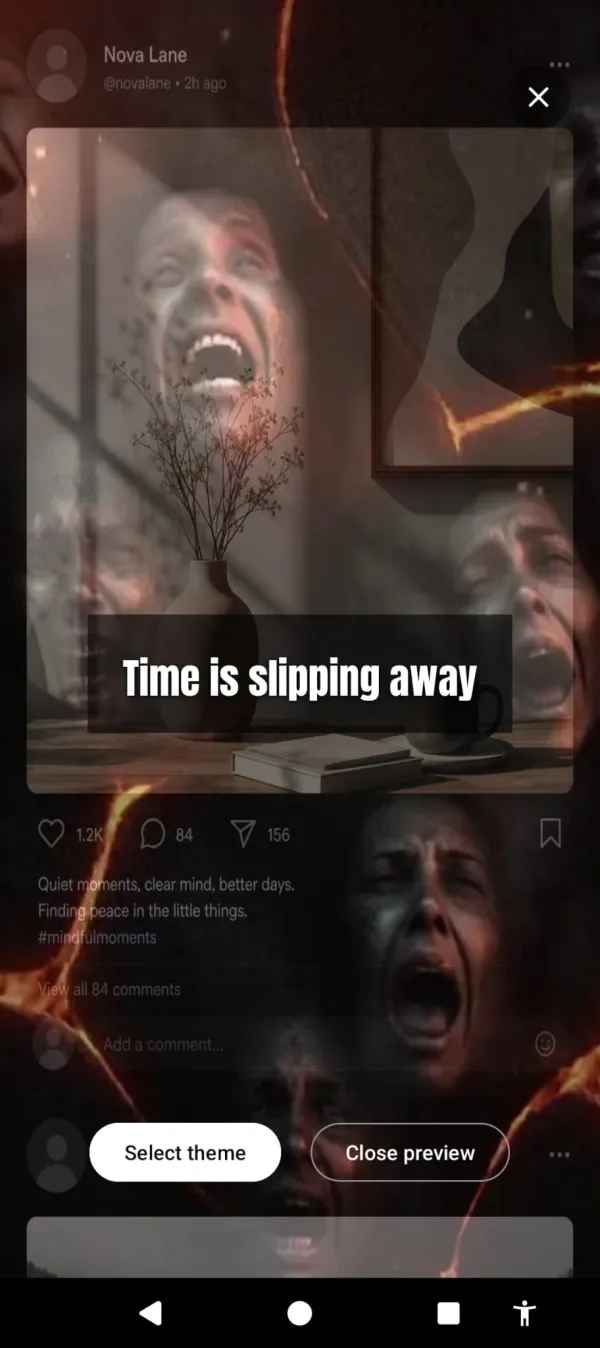
After a grace period (default 30 minutes, configurable), the screen starts to corrupt. Flames lick the edges. Glass cracks across the corners. Bugs crawl in from the sides. At minute 10 past your grace period, it’s subtle — you might not consciously notice. At minute 30, it’s intrusive. At minute 60, the screen is hostile. The center of the screen stays clear, so nothing is blocked, but the periphery is now a slow-motion horror movie playing while you scroll.
Past the grace period, the feed catches fire. Time is slipping away.
That last part is the key difference. Cursed Screen catches the part ScreenZen can’t catch: the long session. ScreenZen can stop you from opening TikTok one time. It cannot do anything about the 90-minute marathon that starts after you tap through the pause. Cursed Screen makes that marathon progressively unpleasant until continuing feels like punishment.
The mechanism is different in a more important way too. Mindfulness prompts ask the brain. Visual deterrence works on the body. You don’t have to reflect on whether you should put the phone down — your eyes tell you. Bugs crawling across your screen is not a thought; it’s a sensation. The reach for the phone slows down because the phone has become aversive to look at, not because you’ve reasoned your way out of opening it.
For users who don’t want darkness, there’s a positive mode — flashes of aurora borealis and golden sunlight cut into the scroll, with short text nudges like “the world misses you” or “someone is smiling nearby.” Same mechanism, different valence. Negative-mode and positive-mode users tend to be different psychological types; both work.
There’s a third piece too. A streak counts the days you stayed under your limit — the one number the app keeps, and it climbs when you use the phone less, not more.
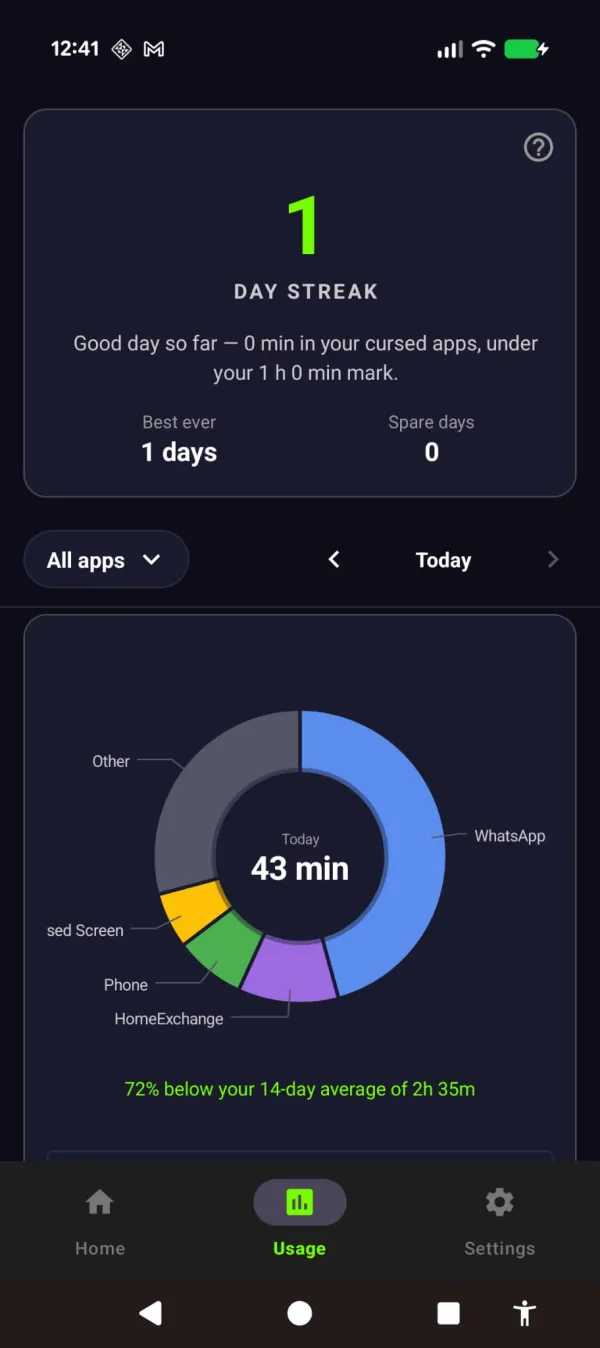
Stay under the line and the streak grows — 72% below your usual.
This is the same approach that makes Cursed Screen useful against the underlying patterns of phone addiction and a different mechanism than the ones covered in most screen time management roundups.
Use both if you want
This is not a “switch to us” article. ScreenZen is free. There is no reason to uninstall it.
The honest framing: ScreenZen and Cursed Screen address different failure points in the same problem.
- ScreenZen reduces how many times you open the app.
- Cursed Screen reduces how long you stay once you’re in.
If your problem is “I keep mindlessly opening Instagram,” ScreenZen alone might be enough. If your problem is “I sit down to check one thing and look up an hour later,” ScreenZen will not save you, but Cursed Screen will. If you have both problems — and most people do — running both apps stacks the interventions: ScreenZen at the door, Cursed Screen inside the room.
The choice between them isn’t really a budget question. ScreenZen is free; Cursed Screen has a free trial, then a subscription or a $98.99 lifetime unlock. If price is the dealbreaker, ScreenZen is free and genuinely good. The real choice is about psychology. Do you respond to a quiet prompt, or do you need something on your screen that you can’t ignore?
For more on the underlying habit and how to actually break the loop, the mechanism matters more than the brand.
The bottom line
ScreenZen is excellent at what it does. It catches the autopilot moment between thinking about an app and opening it. For users whose problem is the reach, it’s the right tool, and it’s free.
If your problem is the scroll itself — the part that happens after you’ve already tapped through every pause and prompt — pre-open friction can’t help you. The intervention has to happen during the session, not before it. That’s the gap Cursed Screen exists to fill.
Try Cursed Screen — Android only, free trial, then subscription or lifetime. Keep ScreenZen installed. They handle different parts of the same problem, and neither one alone is the whole answer.
Ready to try a different approach?
Cursed Screen makes your phone progressively uglier the longer you use it. No blocking, no willpower needed — you'll want to put it down.
Get Cursed Screen on Google Play