AppBlock Alternative: Without Blocking Anything
Disclosure: Cursed Screen is our product. AppBlock data from their Play Store listing and official website. Last reviewed: April 2026.
AppBlock is the most popular app blocker on Android. 15 million users. 4.7 rating. It blocks apps and websites by schedule, location, or usage limits, with a Strict Mode that locks the block behind a PIN.
If Strict Mode works for you, keep using AppBlock. It’s a solid app and it does its job.
You’re not reading this because AppBlock is broken. You’re reading this because you installed it, used it for a week, and then quietly turned it off the next time you wanted to scroll. The blocker can’t fight you when you’re the one holding the off switch. That’s the problem with every PIN-protected blocker, and it’s why you’re searching for something different.
What AppBlock does well
Before getting into where it falls short, give it credit. AppBlock has the most granular blocking controls in the category.
- Strict Mode is genuinely hard to bypass during a session. PIN lock, anti-uninstall protection, cooldown periods you can’t shortcut.
- Flexible triggers. Block by time of day, location, Wi-Fi network, or usage limits. The scheduling system is the most detailed available.
- 20+ browser support for website blocking, including Chrome, Edge, Brave, and Firefox.
- Allowlist and approval access. Partner accountability is built in if you want someone else holding the keys.
- Freemium with a useful free tier. Premium runs $4.99/month or $29.99/year, cheaper than Freedom or Opal.
For someone who genuinely commits to Strict Mode and sets it up before every focus session, AppBlock works. The mechanics are sound.
Where AppBlock breaks
The mechanics are sound. The premise isn’t. Blocking apps assumes you’re a different person at 9 AM (sober, motivated, willing to set up a Strict session) than you are at 11 PM (tired, bored, three drinks in, scrolling TikTok in bed). You’re the same person. Your blocker doesn’t survive contact with the version of you that doesn’t want it.
- Strict Mode is opt-in. You enable it when motivated and skip it when you’re not. The evenings you need it most are the evenings you don’t bother setting it up.
- Per-app blocking is whack-a-mole. Block TikTok, you scroll Instagram. Block Instagram, you scroll YouTube Shorts. The compulsion migrates to whatever’s still available.
- Binary intervention. Apps are either blocked or unblocked. Nothing changes during the actual scroll. Once you’re past the block, you’re on your own for as long as you want to stay.
- Pop-ups during unblocked hours. A common complaint: notifications appear telling you something is blocked when it isn’t actually blocked, breaking trust in the schedule.
- Background apps count as usage. App usage schedules sometimes flag apps running in the background, which triggers blocks at confusing times.
- The binge-restrict cycle. After a strict session ends, many users compensate by scrolling more during unblocked hours. Total screen time stays flat, but the relationship with the phone gets worse — you’re either restricted or rebounding.
None of this is unique to AppBlock. It’s the structural cost of blocking-by-PIN. If phone addiction is about willpower at the moment you reach for the phone, blockers move the willpower battle to the moment you set up the block. Same fight, earlier in the day.
AppBlock vs Cursed Screen at a glance
| AppBlock | Cursed Screen | |
|---|---|---|
| Approach | Blocks specific apps and sites | Makes the phone visually unpleasant |
| When it acts | Before you open the app | During the scroll itself |
| Setup needed | Enable Strict Mode each session | Install once, runs forever |
| Per-app config | Yes — blocklist required | No — tracks total screen time |
| Bypass risk | High (skip Strict, switch apps) | Nothing to bypass |
| Pricing | $4.99/month or $29.99/year | $29.99/year or $98.99 lifetime |
| Platform | Android, iOS, browser extensions | Android only |
How Cursed Screen is different
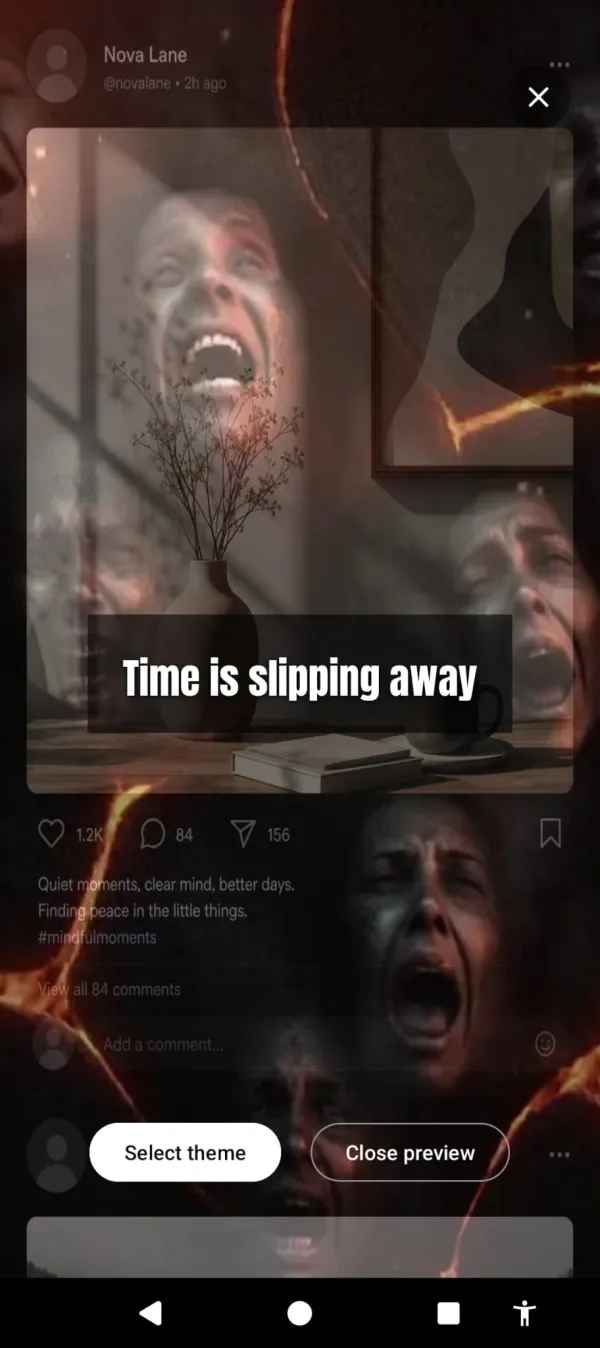
Cursed Screen doesn’t block anything. After a grace period you choose (default 30 minutes daily), your screen starts to change. A red glow seeps in at the edges. Then it gets worse.
Pick your flavor. Glass cracking across the frame like the phone itself is breaking. Insects crawling along the borders. Flames licking the top edge. Each theme stays at the perimeter of the display, so the apps still work, the videos still play, the messages still send. The phone just looks progressively wrong while you use it.
Flames licking the edge of your feed. The apps still work. You just stop wanting them.
There’s a positive version too. Aurora borealis flashing across the screen between scrolls. Golden sunlight breaking in from a corner with a text nudge — “someone is smiling nearby” or “the world misses you.” Same mechanic, opposite emotional register. Some people respond better to the pull than to the punishment.
The key shift is when the intervention happens. AppBlock acts before the app opens. Cursed Screen acts while you’re already inside the scroll. That’s the moment the blocker can’t reach — and that’s the moment the habit actually forms.
Why this might work when AppBlock didn’t
Blockers fail for a specific reason. They put the decision point at the wrong moment. You decide whether to scroll when you’re picking up the phone at 11 PM, not when you’re configuring a schedule at 10 AM. By the time the urge hits, the block is either already disabled or about to be.
Cursed Screen removes the decision entirely. There’s no “should I turn this off?” because there’s nothing to turn off — the phone just changes as you use it. You can keep scrolling. The app won’t stop you. But the longer you stay, the worse your screen looks, and that ugliness compounds the urge to put the phone down.
This is closer to how people actually change a habit. Not through willpower exerted at the moment of compulsion, but through changing the environment so the compulsion feels different. The visual decay turns extended scrolling into a sensory experience your brain starts to associate with discomfort. After a week of seeing bugs crawl across your Instagram feed, picking up the phone at hour three starts to feel off.
It’s the same logic behind treating phone addiction at the source rather than at the symptom. Breaking phone addiction usually requires building an internal signal that says “enough.” Blockers replace that signal with an external one (the lock screen). Cursed Screen builds the internal signal by making the experience itself feel wrong.
Honest pros and cons
It would be dishonest to pitch this without the trade-offs.
What Cursed Screen does well:
- Nothing to disable. The intervention can’t be bypassed because there’s no block to bypass.
- A one-time lifetime unlock ($98.99) if you’d rather not subscribe — AppBlock is subscription-only — or $5.99/month / $29.99/year.
- Tracks total screen time, not per-app usage. Doesn’t matter if you switch from TikTok to Reels — both count.
- Works across all apps without configuration. Install it once and it covers everything.
- Whitelisting available for apps that matter — messaging, navigation, music — so the overlay doesn’t punish you for using your phone like a tool.
Where Cursed Screen falls short:
- Android only. No iOS version, no desktop, no browser extension. If you want cross-device coverage, AppBlock or a website blocker is a better fit.
- It doesn’t actually block anything. If your problem is needing a hard wall at 10 PM to stop you from opening Reddit, this won’t be it. Some people genuinely need the lockout.
- The visual deterrence is uncomfortable. That’s the point, but it’s not for everyone. If you find the idea of glass cracking across your screen distressing rather than useful, this isn’t the right tool.
- No analytics dashboard. If you like reviewing weekly usage charts, look at apps that manage screen time with reporting features instead.
The honest framing: AppBlock is the right tool if you can commit to using Strict Mode. Cursed Screen is the right tool if you’ve already proven you won’t.
Try the other approach
Cursed Screen is on the Play Store with a free trial. Subscribe monthly or annually, or pay once for lifetime access.
If AppBlock’s blocking model fits your life, keep using it. If it didn’t, you already know why. An app you can disable when you don’t want it isn’t the same as an app that changes what your phone feels like to hold.
Nothing is blocked. You can keep scrolling. The phone just won’t be a place you want to be.
Ready to try a different approach?
Cursed Screen makes your phone progressively uglier the longer you use it. No blocking, no willpower needed — you'll want to put it down.
Get Cursed Screen on Google Play