Freedom App Alternative: Same Goal, Different Approach
Disclosure: Cursed Screen is our product. Freedom data from their website and Play Store listing. Last reviewed: April 2026.
Freedom has been around for over a decade. It’s the grandfather of cross-device blockers — Android, iOS, Mac, Windows, Chrome, Linux, all running off one synced session. Block at 9am on your laptop, the block lives on your Android phone too. $39.99 a year or $199 once. A real piece of software with a real track record.
It works if you stay subscribed and stay inside the model. You’re here because one of those things stopped being true.
Maybe the trial ended and the renewal email arrived. Maybe the VPN keeps fighting your work setup. Maybe Locked Mode broke your day and you cancelled the next session out of spite. Maybe you bought lifetime three years ago and still scroll TikTok every night because Freedom only stops the apps you remembered to add to the list.
What Freedom does well
Credit where it’s owed. Freedom isn’t a half-baked app pretending to be a focus tool. It actually does the thing it sells.
Cross-device sync is the real killer feature. Start a session on your Mac, it follows you to your phone. No other app in this category covers six platforms with one session. If your scrolling moves between devices — laptop at work, phone at home, iPad in bed — Freedom blocks all three at once. Most competitors lock one screen and shrug at the rest.
Locked Mode is hard to bypass. Once a session starts with Locked Mode on, you cannot end it early. No “just five minutes,” no settings backdoor. AppBlock has the same idea with Strict Mode. Freedom’s version is the older, more polished one.
Preset blocklists save the setup work. Social media, news, shopping, adult sites — curated lists ship in the app so you’re not adding URLs one by one. Block-all-except mode flips it: shut down the entire internet and whitelist only what you need. Brutal but effective for deep work.
Brain.fm focus sounds come with the subscription. Nice if you work to background audio.
For the broader category, our app blocker for Android and site blocker breakdowns cover where each tool fits.
Where Freedom breaks
The pitch is great. The mobile reality is messier than the marketing suggests.
VPN-based blocking eats battery. Freedom routes traffic through a local VPN to filter what your phone can reach. That VPN runs the whole session. On Android, persistent VPNs are a known drain — radio stays awake, packets get inspected, indicator pinned. A few hours of focus mode warms the phone.
One VPN at a time. Android only allows a single active VPN. If your job needs a corporate VPN, or you run a privacy VPN like Mullvad or Proton, Freedom either won’t start or kicks the other one off. The OS owns that slot.
The Android escape hatch. Locked Mode stops you cancelling the session inside the app. It doesn’t stop you opening Android Settings, finding the VPN entry, and tapping disconnect. Two taps. Session bypassed. The block is enforced by the VPN being on — turn the VPN off, blocking stops. Reddit threads about this go back years.
No permanent free tier. Seven days, then you pay or you’re out. Fine for software with clear ROI, less fine for a habit tool you use sporadically. ScreenZen is free forever. one sec is freemium. Most of the friction-based screen time apps give you something for nothing. Freedom doesn’t.
$40/year forever. $199 lifetime softens it, but it’s the priciest base subscription in the category outside of Opal. You’re paying yearly to stop yourself doing something you didn’t want to do anyway. A lot of people churn after the first renewal.
Blocking is binary. A site is blocked or it isn’t. No warning you’re about to hit hour three. No signal during the scroll. When the session ends, the block snaps off. A lot of people end a Freedom session and immediately open Instagram — the exact thing they were avoiding. The block was the only friction, and now it’s gone.
Freedom vs Cursed Screen at a glance
| Freedom | Cursed Screen | |
|---|---|---|
| Approach | VPN-based blocking | Visual overlays on top of the screen |
| Platforms | Android, iOS, Mac, Windows, Chrome, Linux | Android only |
| VPN required | Yes | No |
| Price | $39.99/year or $199 lifetime | $29.99/year or $98.99 lifetime |
| Cross-device sync | Yes | No |
| Free trial | 7 days | Yes, on Android |
| Works during the scroll | No — only at session boundaries | Yes — overlay scales with screen time |
| Can be bypassed | Toggle VPN off in Android settings | Uninstall the app |
| Battery cost | VPN runs the whole session | Overlay detaches when grace period hasn’t expired |
| Setup per use | Start a session, pick a list, set duration | Set it once, runs in the background |
How Cursed Screen handles it instead
Different paradigm. Cursed Screen doesn’t block anything. There is no list of apps. There is no session to start. There is no VPN.
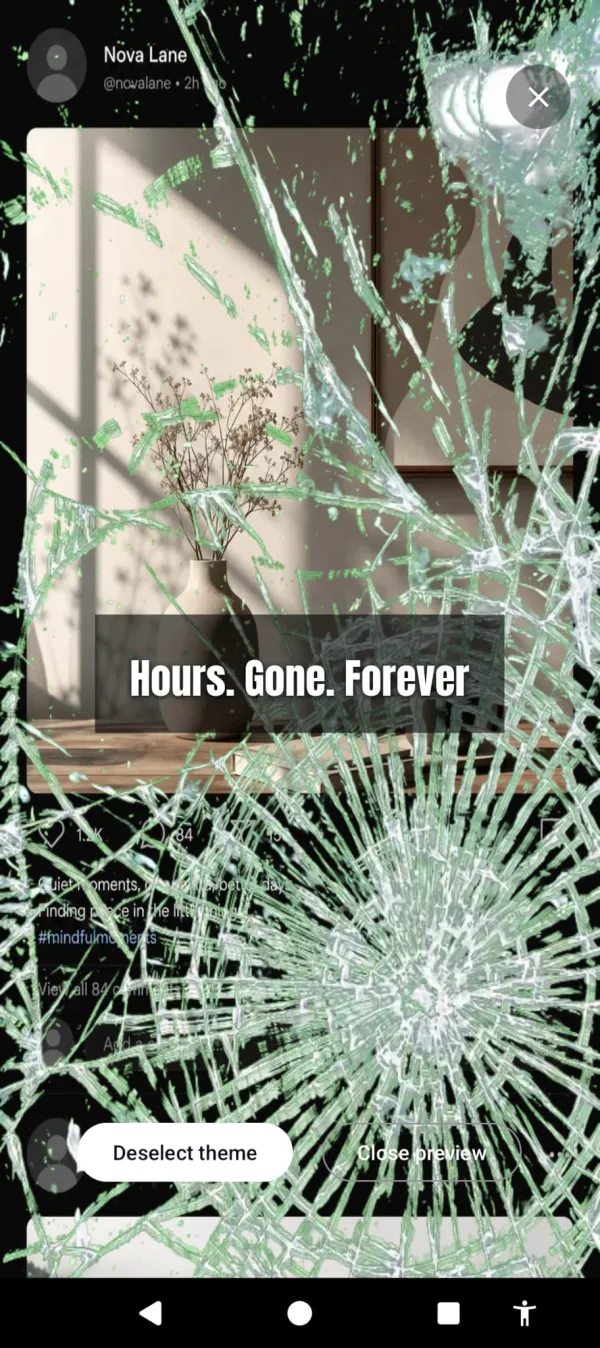
After a grace period you configure — default 30 minutes for daily tracking, 5 minutes for per-session tracking — visual overlays start creeping in from the edges of the screen. Red glow at first. Then flames licking the sides. Then bugs crawling across the bezel. Glass cracks. The longer you stay on the phone, the worse it looks. Pick a theme or rotate through several. Hellfire if you want the threat. Aurora and sunlight if you want a reminder of what’s outside.
Stay too long and the glass gives out. Hours. Gone. Forever.
The whole thing runs as an Android overlay. No VPN. No interference with your work VPN, your privacy VPN, your tethering, your hotspot. Battery cost is the cost of drawing pixels at the edge of the screen — much lighter than routing every packet through a filter.
Nothing is blocked. Every tap goes through. Every app opens. You can keep scrolling all night if you want. The phone just becomes progressively unpleasant to look at while you do it. That changes the choice from “the app won’t let me” to “I don’t want to look at this anymore.” For a lot of people that second framing actually sticks, where the first one teaches them how to disable the blocker.
And it keeps one number pointed the right way: a streak for the days you stayed under your limit, which climbs when you use the phone less.
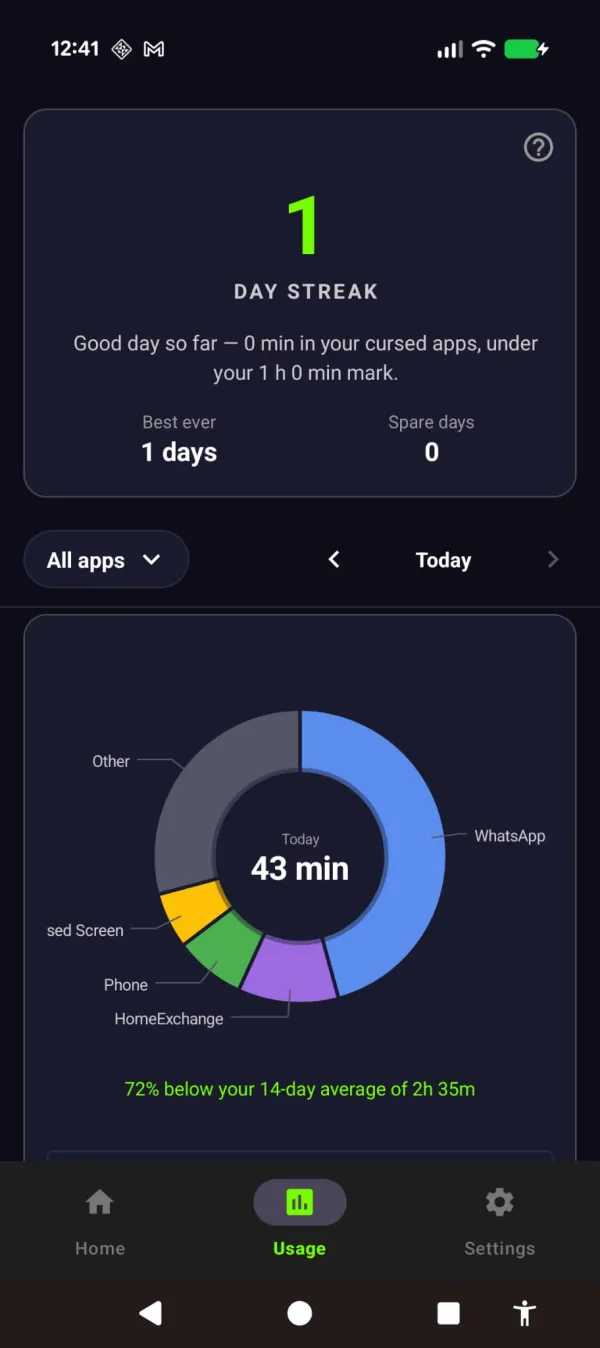
The streak grows the day you stay off — 72% under your usual.
If you want the deeper case for why visible decay outperforms binary blocking, the phone addiction and screen time write-ups go further on the mechanism.
Honest tradeoffs
This isn’t a Freedom replacement on every axis. A few places Freedom still wins:
- Cross-device. Cursed Screen is Android-only. If you scroll equally on your phone and your Mac, Freedom covers both. We don’t.
- Hard blocking. If you have a deadline in four hours and you know you’ll cave, a Locked Mode session is the right tool. The overlay won’t physically stop you. It will only make staying ugly.
- Schedules. Freedom has rich session scheduling — recurring blocks, advance scheduling, calendar-style focus windows. Cursed Screen is “on, with a grace period.” Simpler, less control.
- Desktop work. Most of Freedom’s polish is on Mac and Windows. For laptop-heavy workflows, that’s where it shines.
If those are your needs, keep Freedom. The cross-device coverage genuinely has no peer at this price point, and Locked Mode does what it says.
Where Cursed Screen wins
If you’re on Android, here’s the case:
- $98.99 lifetime, or $29.99/year. The lifetime unlock is about half of Freedom’s $199, and the annual plan undercuts Freedom’s $39.99. Buy once and the yearly renewal email stops.
- No VPN conflict. Run your work VPN, your privacy VPN, whatever you want. Cursed Screen sits at the overlay layer, not the network layer.
- Works during the scroll, not just at the boundary. The intervention isn’t “you can’t open this app.” It’s “you’ve been on the phone for 90 minutes and there are flames around the edge of your screen now.”
- Nothing to bypass. There’s no session to cancel, no VPN to disable, no Locked Mode to wait out. The only way to stop the overlay is to put the phone down or wait out the next session. Both of which are the actual goal.
- No accounts, no sync, no servers. The app runs locally. Nothing to log into, nothing to leak.
The pitch isn’t that Cursed Screen does what Freedom does, cheaper. It does something different. Freedom builds a wall around the apps. Cursed Screen makes the apps feel wrong to use. Different tools for different stages of the problem.
So which one
If you need cross-device coverage and you’ll stay subscribed, Freedom is the right call. It earned its reputation.
If you’re Android-only, tired of paying yearly for a tool you keep finding ways around, or exhausted by the cycle of starting a session and immediately resenting it — try the other approach. Your phone is cursed. We just help you see it.
Cursed Screen on Android. Free trial, then $29.99/year or a $98.99 lifetime unlock. No VPN, no accounts.
Ready to try a different approach?
Cursed Screen makes your phone progressively uglier the longer you use it. No blocking, no willpower needed — you'll want to put it down.
Get Cursed Screen on Google Play