Site Blockers for Android: Why You Keep Disabling Them
You installed a site blocker to stop yourself from opening Reddit during work hours. You configured the blocklist. You set the schedule. Two days later you opened Chrome, typed reddit.com out of muscle memory, saw the block page, and switched to a different browser that wasn’t covered. By Friday you’d uninstalled the blocker entirely and were back to the same Reddit tab you’ve had open since 2019.
Site blockers are the second most searched category of self-control tools on Android, right behind the app blocker on Android crowd. They’re also the category with the biggest gap between what people expect and what actually happens.
How site blockers work on Android
Site blocking on Android is harder than on desktop because there’s no system-level DNS filtering that a regular app can control without root access. Instead, Android site blockers use one of three methods:
VPN-based filtering. Apps like Freedom route your traffic through a local VPN that blocks connections to specific domains. This works across all browsers and apps. The downside: you can only run one VPN at a time on Android, so if you need a real VPN for work or privacy, you can’t use Freedom simultaneously. Freedom costs $40/year and works across Android, iOS, Mac, Windows, and Chrome.
Accessibility service interception. Apps like AppBlock and ScreenZen use Android’s Accessibility Service to detect when you open a blocked URL in your browser and then redirect you or show a block screen. This doesn’t require a VPN, which means it plays nice with other apps. AppBlock supports 20+ browsers including Chrome, Firefox, Edge, and Opera. The limitation: it only works in supported browsers. Open an in-app browser (like the one inside Reddit or Twitter) and the block doesn’t trigger.
Browser extension approach. Some site blockers work as extensions inside specific browsers, usually Chrome. This is the most limited approach because it only covers one browser, and switching to Firefox or Samsung Internet bypasses it entirely. But it’s also the simplest to set up.
The actual site blockers worth considering
Freedom — The most complete option. VPN-based, so it blocks sites across all browsers and apps. Supports scheduling, locked mode (can’t disable during a session), and cross-device sync. $40/year or $199 lifetime. The VPN approach is the most thorough but means you can’t use a separate VPN simultaneously.
AppBlock — Blocks both apps and websites. Uses Accessibility Service, not a VPN. Supports 20+ browsers. Strict mode with PIN lock prevents disabling during active blocks. $5/month or $30/year. The most popular option with 15 million users and a 4.7 rating.
One Sec — Doesn’t block sites. Instead, it inserts a breathing exercise when you open distracting apps or websites in supported browsers. The idea is that the 5-second pause breaks the autopilot. Free for one app, Pro from €15/year for unlimited.
ScreenZen — Free. Uses Accessibility Service to block websites with customizable wait timers and usage limits. No ads, no in-app purchases. Rated 4.7 with 25,000 reviews. The best free option.
Chrome’s built-in site settings — You can block specific sites in Chrome settings. It’s crude and easy to undo (two taps), but it’s free and requires no app.
Host file editing (rooted phones only) — If your Android is rooted, you can edit the system hosts file to redirect distracting domains to 127.0.0.1. This blocks the site at the system level across all apps and browsers. It’s the most thorough approach and the hardest to undo on impulse. But it requires root access, which most people don’t have and which voids some warranties. If you’re technical enough to root your phone, you’re technical enough to un-root the hosts file at 1am when you want to check Reddit. The technical barrier is higher than a PIN lock, but it’s still conquerable.
Why site blockers keep failing
Every site blocker on this list has the same structural vulnerability: you installed it, which means you can uninstall it.
Strict mode helps. Freedom’s locked sessions can’t be disabled until the timer expires. AppBlock’s PIN protection adds a barrier. But strict mode is opt-in. You enable it when you’re motivated. You skip it when you’re not. And the sessions you skip are the ones you need it most.
There’s also the substitution problem. Block Reddit and you open Twitter. Block Twitter and you open YouTube. Block YouTube and you open Instagram. The site isn’t the problem. The compulsion to consume is the problem. A site blocker treats individual URLs as the enemy. The enemy is the scroll itself, and it lives on every site with a feed. Same shape as a game blocker — kill the target and the compulsion finds a new one.
VPN-based blockers have an additional issue on Android. Many workplaces require their own VPN. If your company uses a VPN for remote access, Freedom’s local VPN can’t run simultaneously. You end up choosing between blocking Reddit and accessing your work network, which isn’t a real choice.
And all site blockers share the adaptation problem. You learn the workarounds. In-app browsers. Incognito mode (some blockers don’t cover it). Switching browsers. Using the mobile app instead of the website. The block becomes a puzzle to solve, and solving puzzles is more engaging than the productivity you were supposed to be doing. The same dynamic plays out if you try to figure out how to block YouTube Shorts — every method has a workaround you’ll find within a week.
There’s an irony buried in here. The same executive function that site blockers are supposed to protect — your ability to stay on task and resist distraction — is the same executive function you use to find workarounds. The person who can configure a VPN-based site blocker with custom schedules and locked mode is also the person who can Google “how to bypass Freedom app” in 30 seconds. Intelligence isn’t the problem. The phone is the problem.
The real question: what are you blocking, and why?
When you install a site blocker, you’re telling yourself: “I can’t be trusted with access to this website.” That framing creates an adversarial relationship with your own phone. You’re the prisoner and the warden, and the prisoner always knows the warden’s schedule.
The alternative framing: “What if using these sites just felt worse the longer I was on them?”
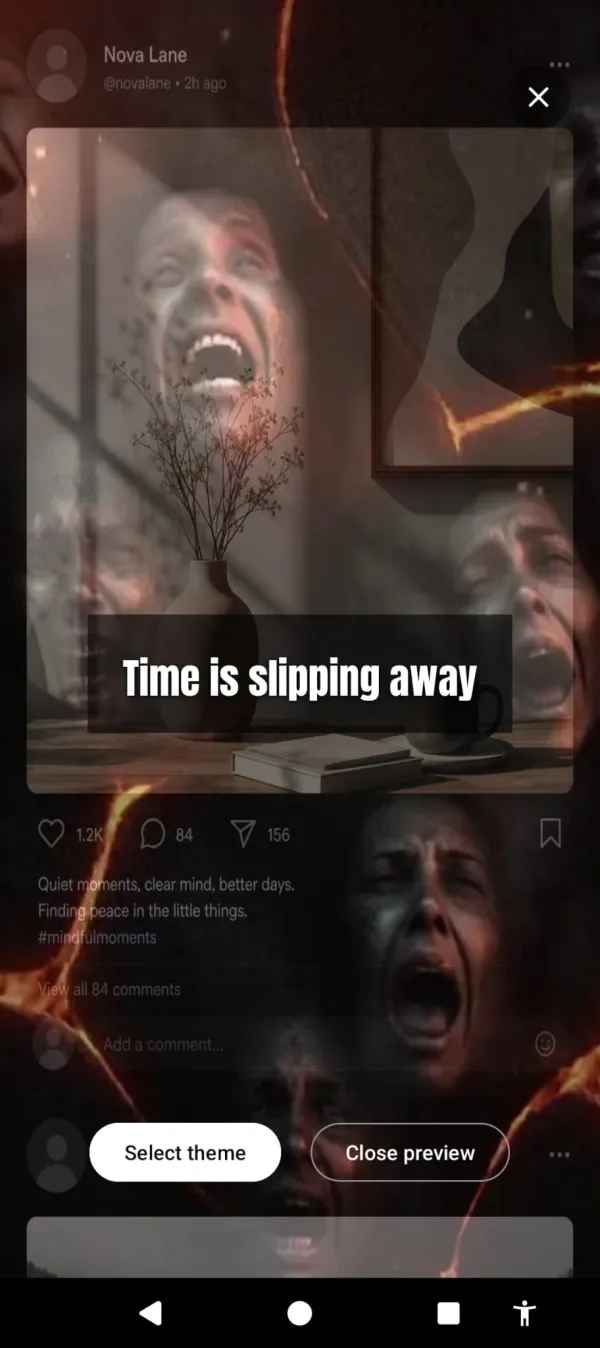
That’s Cursed Screen. It doesn’t block any website. It doesn’t filter any URL. It doesn’t use a VPN or an Accessibility Service to intercept your browsing. Instead, it makes your phone’s screen progressively ugly the longer you use it. After a grace period, overlays creep in from the edges. Flames licking at the edges. Glass fracturing. Bugs crawling across your display.
Reddit still loads. YouTube still plays. Every site works. But the longer you browse, the worse the experience gets. You don’t need to remember which sites you blocked. You don’t need to configure a blocklist. You don’t need to choose between your work VPN and your site blocker. The phone just looks increasingly wrong the more you use it, across all apps and all sites equally.
This sidesteps every failure mode of site blockers:
- No blocklist to maintain. It targets screen time, not URLs.
- No VPN conflict. It uses a visual overlay, not network filtering.
- No substitution problem. Switch from Reddit to YouTube to Instagram — the overlay follows because it’s tracking total usage, not individual sites.
- Nothing to disable. There’s no block to bypass. The overlay is a visual consequence, not a restriction.
- Works inside in-app browsers. The overlay sits on top of everything.
For people who respond to encouragement instead of horror, there’s a positive mode. Aurora borealis and golden sunlight flash across your screen between browsing sessions with messages like “the world misses you.” Same mechanism, different tone.
What to actually do
If you’ve never tried a site blocker, start with ScreenZen. It’s free, works well, and the friction-based approach is less annoying than hard blocking. You might be surprised how often the 5-second pause is enough.
If you’ve tried site blockers and keep disabling them, the blocker model isn’t for you. You’ve proven that. Trying a stricter version of the same thing isn’t the answer.
Cursed Screen has a free trial on Android. Subscribe monthly or annually, or pay once for lifetime access. No VPN. No blocklist. Just a phone that gets uglier the longer you browse. The sites you waste time on will still work. They’ll just look like they’re loading on a phone that’s falling apart.
The sites still load. They just load on a screen that looks like it’s on fire.
You don’t need a better blocklist. You need a reason to stop that survives the moment your willpower runs out.
The best site blocker is the one you don’t fight against. If you’re fighting your own tool, the tool has already lost. The wider comparison of apps to manage screen time covers what to try when blocking has already failed you.
Reduce your screen time — without blocking anything
Cursed Screen makes your phone progressively uglier the longer you use it. No blocking, no willpower needed — you'll want to put it down.
Get Cursed Screen on Google Play