How to Stop Scrolling on Your Phone (For Real)
You’ve said it to yourself. “I need to stop scrolling.” You’ve said it while scrolling. You said it 20 minutes ago and you’re still here. The intention doesn’t translate to action because scrolling isn’t a choice you’re making. It’s a behavior loop running below conscious thought.
Your thumb swipes before your brain decides. That’s not laziness. That’s conditioning. The apps you’re scrolling through have been refined over a decade by teams of engineers whose explicit goal is to keep you swiping. You’re not failing at self-control. You’re losing to a system designed to beat self-control. The full anatomy of this loop lives in our piece on doomscrolling — what it is, why it works, and why willpower is the wrong tool.
Why “just stop” doesn’t work
The scroll loop works like a slot machine. Variable-ratio reinforcement: most swipes give you nothing interesting, but every 10th or 15th swipe delivers something that hits. A funny video. An outrage post. A friend’s update. Your dopamine system registers those unpredictable rewards and keeps your thumb moving because the next one might be good.
Telling yourself to stop is like telling yourself to stop pulling the lever on a slot machine that pays out every 15 pulls. You know you should stop. Your reward system disagrees. The reward system wins because it doesn’t need your permission to operate. This is phone addiction operating beneath your conscious decision-making — by the time you “decide” to keep scrolling, the decision is already made.
A 2025 study on compulsive phone use confirmed this: the scrolling behavior persists even when users report wanting to stop. The gap between intention and action is neurological, not motivational.
What slows the scroll
Remove the entry point. Move social media apps off your home screen. Put them in a folder on the third screen. You won’t stop scrolling once you’re in the app. But adding two extra taps before you get there catches some of the autopilot opens. Not all. Some.
Add friction at the door. ScreenZen (free) inserts a pause before distracting apps open. A countdown. A “what are you here for?” prompt. The pause breaks the autopilot pattern. You still open the app sometimes. But the mindless opens drop.
Set a physical boundary. Phone in a different room during dinner. Phone charges in the kitchen, not the bedroom. You won’t walk to the kitchen to scroll. You will reach to your nightstand. Distance works because it converts an unconscious behavior (reaching for the phone) into a conscious decision (getting up and walking).
Delete the worst offender for one week. Not all of them. The one app that eats the most time. Check your screen time stats. Delete that one for 7 days. You’ll survive. If you reinstall it after the week, you’ll have 7 days of data showing you what life without it looks like. Most people find their worst offender is one of the big social media addiction candidates — TikTok, Instagram, or YouTube.
What stops the scroll mid-session
The approaches above target the moment before you start scrolling. They do nothing once you’re 40 minutes deep. The session has already started. The dopamine loop is engaged. Your conscious brain checked out at minute 3.
This is the gap most tools miss. App blockers fire at the door. Friction apps fire at the door. Timers fire at a scheduled moment. Nothing changes the experience of the scroll itself. The cognitive consequence of those missed minutes — what people are calling brain rot — builds entirely inside the session the tools ignore.
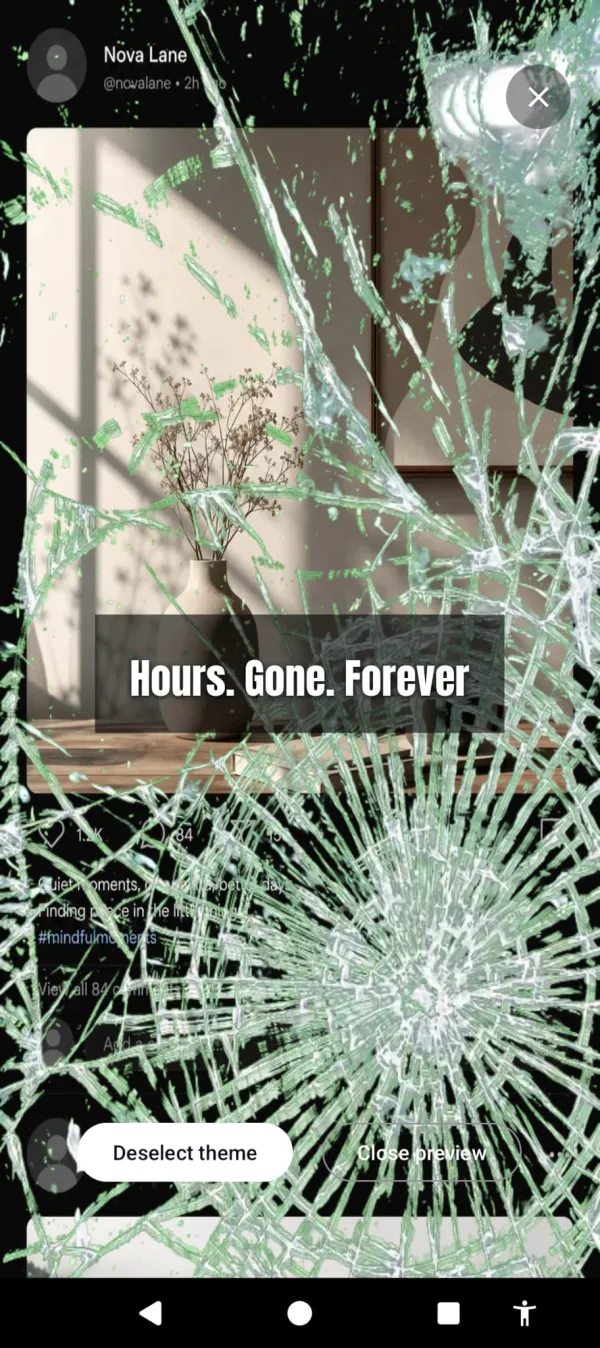
Cursed Screen targets the session. After a grace period, your phone’s screen fills with visual overlays. Crawling insects. A red glow. Glass fracturing across your feed. The content is still there. The scroll still works. But the phone looks increasingly wrong, and that changes how the scrolling feels.
You don’t decide to stop. The phone makes continuing less rewarding. At minute 10, the overlay is subtle. At minute 30, it’s uncomfortable. At minute 60, the screen is hostile. Most people put the phone down before they reach 60.
Minute 1 it’s subtle. Minute 30 the glass is splitting across your feed.
Session-based tracking means the moment you put the phone down, the overlay starts improving. Three minutes off forgives one minute on. The phone rewards breaks. Pick it back up and it resumes where it left off.
It doesn’t only push with dread. Flip to positive mode and the screen breaks into aurora and sunlight instead — pulled toward what’s off the phone rather than shoved off it. Negative, positive, or mix; you set the blend. And a streak rewards every day you stay under your limit, so stopping the scroll starts to add up to something.
The scroll isn’t the problem
Scrolling for 5 minutes to check on friends is fine. Scrolling for 90 minutes while your dinner gets cold is the problem. The difference between the two isn’t willpower. It’s whether anything in your environment signals that you’ve been on too long.
Your phone has no signal. It looks the same at minute 1 and minute 90. It’s designed that way. The infinite scroll has no bottom. No endpoint. No visual change that says “you’ve been here a while.”
Cursed Screen adds that signal. Free trial on Android. Subscribe monthly or annually, or pay once for lifetime access. The scroll still works. It just stops feeling like the scroll is worth it. For the longer breakdown of seven approaches that actually work, read how to stop doomscrolling.
Want a tool that does this automatically?
Cursed Screen makes your phone progressively uglier the longer you use it. No blocking, no willpower needed — you'll want to put it down.
Get Cursed Screen on Google Play