How to Stop Doomscrolling: 7 Things That Actually Work
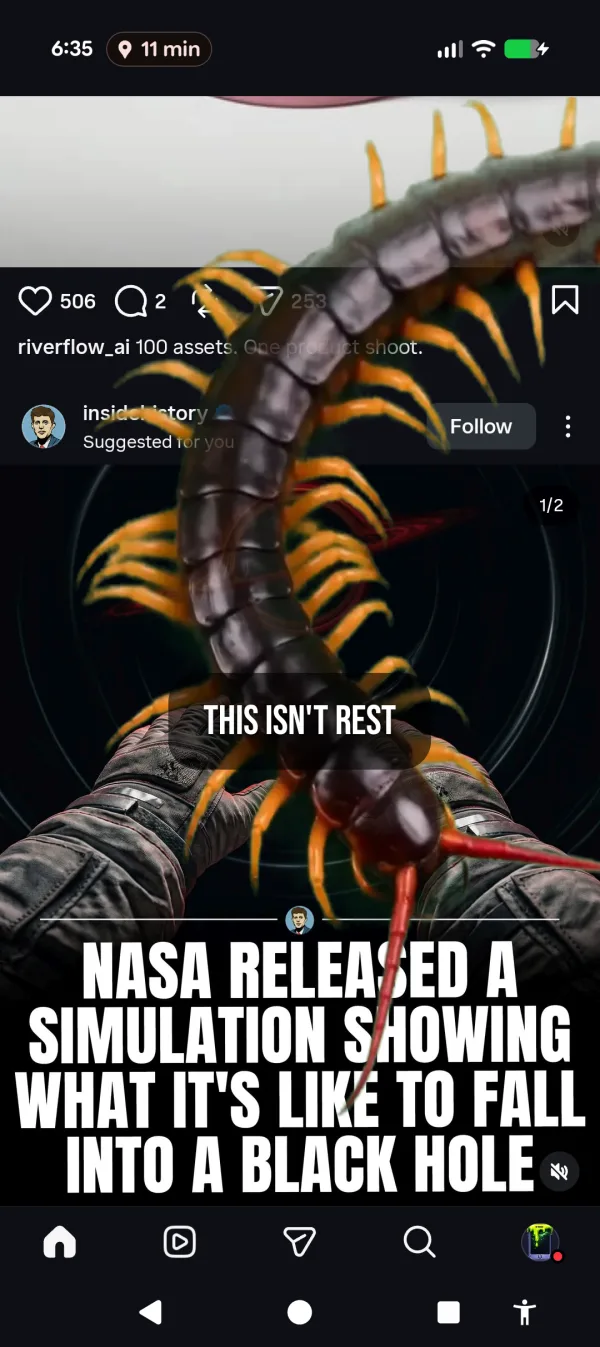
You opened TikTok to check one notification. That was 45 minutes ago. You’re 200 videos deep into a feed you didn’t choose, watching a stranger organize a pantry in a house you’ll never visit. You know you should stop. You keep swiping.
72% of TikTok users report watching more content than they intended in a given session, according to a 2025 study in Cyberpsychology, Behavior, and Social Networking. That’s not a personal failing. The algorithm is doing exactly what it was designed to do. If you want the deeper anatomy of what’s actually happening, read what doomscrolling is first.
You’re not weak. You’re outmatched. Here are 7 things that actually help.
1. Understand why you can’t stop
Doomscrolling isn’t a habit. It’s a feedback loop.
Short-form video fires your dopamine system every 15-30 seconds. Each swipe is a micro-reward. Your brain treats “maybe the next one is good” the same way a slot machine treats “maybe the next pull pays.” The average person swipes through 300+ short-form videos per day across platforms. That’s roughly 2.5 hours of passive consumption you didn’t plan.
Instagram Reels make up over 50% of the time users spend on Instagram. Not the feed. Not Stories. Not DMs. Reels. The part designed to keep you swiping. YouTube Shorts crossed 70 billion daily views in 2025. TikTok has 955 million monthly users. These aren’t apps. They’re dopamine delivery systems with a content library attached.
The reason you can’t stop scrolling isn’t that you lack discipline. It’s that the scroll is designed by teams of engineers running A/B tests on millions of people to figure out exactly how long to show you a video, what thumbnail to display next, and when to serve you something just surprising enough to keep your thumb moving. You’re not fighting a bad habit. You’re fighting a machine that knows your preferences better than you do.
You can’t outthink that system. Willpower is the wrong tool for this fight. So what’s the right one? The honest answer is that this is phone addiction in its most refined form — and treating it as such changes the playbook.
2. Delete the apps (and accept you’ll reinstall them)
The nuclear option. Delete TikTok, Instagram, YouTube. It works for about 72 hours. Then you reinstall one of them “just to check something” and you’re back where you started.
The first day feels liberating. The second day feels restless. By the third day you’re rationalizing: “I need Instagram for work.” “My friend only messages on TikTok.” “I’ll just reinstall it and set a timer this time.”
64% of people have tried a digital detox from social media. 49% came back. Those aren’t great odds.
Deletion works for some people. Be honest about whether you’re one of them. If you’ve deleted and reinstalled the same app more than twice, this approach has already failed you. And it has a hidden cost: you lose the parts of these apps you actually use. Group chats. Event invites. Messages from people who only exist on that platform. Going nuclear means losing those too. The structural reasons this happens are spelled out in our piece on social media addiction.
3. Set screen time limits (and accept you’ll tap “ignore”)
Every phone has built-in screen time limits. Android’s Digital Wellbeing lets you set app timers. iOS has Screen Time. They pop up a full-screen notification when you hit the limit.
You tap “OK” and keep scrolling. Every time.
Only 12% of smartphone users actively use built-in screen time limit features, despite 80% saying they want to use their phone less. That gap tells you everything. The tools exist. People install them, configure them, and then override them the first time they hit a limit during a good scroll session.
The problem with limits is they ask for willpower at the exact moment you have none. You’ve been dopamine-flooding for 45 minutes. Your prefrontal cortex is checked out. A polite notification asking if you’d like to stop is not going to cut it. It’s like asking someone who’s drunk to decide if they should have another drink. The asking is the problem.
4. Use a friction app like One Sec or ScreenZen
Friction apps add a pause before you open distracting apps. One Sec makes you take a deep breath. ScreenZen shows a countdown and asks “is this important?”
These work better than limits because they interrupt the autopilot. That 5-second pause is enough to break the loop for some people. One Sec claims a 57% reduction in app opens. ScreenZen is free and has a 4.7 rating with 25,000 reviews. Both are legitimate tools.
The catch: friction fades. After a few weeks, you breathe through the One Sec exercise on autopilot. The pause stops feeling like a pause and starts feeling like a loading screen. ScreenZen’s “is this important?” prompt becomes a button you tap without reading, the same way you tap “accept cookies” on every website.
Friction works on the decision to open an app. It doesn’t do anything once you’re inside. If you open TikTok and the friction app lets you through, you’re on your own. Nothing stops you from scrolling for the next two hours. The intervention happens at the door, not inside the room.
5. Turn your phone grayscale
Remove the color, remove the appeal. Grayscale mode makes your phone look like a newspaper from 1952. TikTok thumbnails become gray blobs. Instagram loses its visual punch. You can enable it on Android through Developer Options or Digital Wellbeing’s Bedtime Mode.
This works for a week, maybe two. Then your brain adjusts. Gray becomes normal. The dopamine loop doesn’t care about color; it cares about novelty. And the content is still novel, even in black and white. You’ll still watch a 30-second video of a dog doing something funny. The dog is still funny in grayscale.
The other problem: grayscale makes your entire phone worse, not just the distracting parts. Maps look terrible. Photos look dead. Work apps become harder to use. You end up toggling it off during the day and forgetting to turn it back on at night. The friction of living with a gray phone is spread evenly across everything, which means the useful parts of your phone suffer as much as the addictive ones.
6. Replace the behavior (the therapist answer)
Every article about doomscrolling tells you to “replace scrolling with a healthier habit.” Go for a walk. Read a book. Call a friend. Journal. Meditate. Do a puzzle.
This is correct and useless. You know you should go for a walk. You knew that before you opened TikTok. The problem isn’t information. The problem is that your phone is more compelling than a walk at 11pm when you’re tired and the couch is comfortable and TikTok is right there.
The intention-behavior gap is real. Researchers call it that. You intend to stop scrolling. You don’t stop. That gap isn’t a character flaw. It’s a predictable response to a stimulus that was engineered to be irresistible.
Replacement does work in one specific scenario: when you physically separate yourself from the phone. Put it in a drawer. Leave it in a different room. Charge it in the kitchen instead of the bedroom. If the phone isn’t within arm’s reach, you’ll read, talk, sleep, or stare at the ceiling. Any of those are better than your 300th Reel of the day. But this requires you to make that decision before you start scrolling, not during.
7. Make your phone feel wrong to use
This is the approach I built Cursed Screen around, because everything above either failed me or faded.
Instead of blocking apps, limiting time, or adding friction, Cursed Screen makes your phone’s screen progressively ugly the longer you use it. You get a grace period of normal use. After that, visual overlays creep in from the edges. Hellfire licking across your display. Glass cracking over your feed. Bugs crawling from the corners of your screen. The longer you scroll, the worse it gets.
Nothing is blocked. All taps work. You can keep watching Reels. But your screen looks like it’s infested, and that changes how scrolling feels. The Reels are still there. They just look broken.
Nothing’s blocked. The feed just looks like it’s infested — because it is.
The difference between this and everything else on this list: it doesn’t ask for your willpower. Limits ask for willpower. Friction apps ask for willpower. Replacement asks for willpower. Cursed Screen changes the sensory experience of scrolling so that continuing feels gross instead of rewarding. You don’t need to decide to stop. You want to stop because your phone looks like it’s rotting.
It works while you’re inside the app, not just at the door. That’s the gap friction apps miss. One Sec can stop you from opening TikTok. It can’t do anything about the two-hour scroll once you’re in. Cursed Screen gets worse the entire time you’re scrolling. Minute 5 looks different from minute 30 which looks different from minute 60.
If you respond better to a pull than a push, there’s a positive mode too. Flashes of aurora borealis and golden sunlight interrupt your feed with messages like “the world misses you” and “someone is smiling nearby.” Not punishment. Not blocking. Just a reminder that something better exists on the other side of the screen.
What actually works long-term
A two-wave longitudinal study published in 2025 found that doomscrolling is significantly associated with higher levels of anxiety, depression, and stress. This isn’t something you’ll just grow out of. The platforms are getting better at keeping you, not worse. The cognitive side of this — what shows up as brain rot — is the part that reverses slowest.
The approaches that stick share one thing: they change the experience of using your phone, not just the rules around it.
Screen time limits are rules. You break rules. Friction apps are speed bumps. You drive over speed bumps. Grayscale is a filter. You adapt to filters.
Making your phone feel wrong is different. You don’t adapt to hellfire on your screen the way you adapt to a gray filter or a 5-second breathing exercise. Your instinct to avoid something that looks broken is deeper than your instinct to obey a timer.
Try whichever approach on this list sounds right for you. If you’ve already tried the top 6 and you’re reading this article because none of them stuck, Cursed Screen has a free trial on Android. If it works for you, subscribe monthly or annually, or pay once for lifetime access. No personal data collected. Just a phone that gets uglier the longer you stare at it.
Your feed isn’t going to stop being addictive. But it can start looking like it. If you want the shorter, tactical version of this — what to do in the moment your thumb refuses to listen — read how to stop scrolling.
Want a tool that does this automatically?
Cursed Screen makes your phone progressively uglier the longer you use it. No blocking, no willpower needed — you'll want to put it down.
Get Cursed Screen on Google Play